Three years ago, I had massive FOMO around Bricks Builder. I bought third-party plugins, wireframe libraries, and courses because I thought each new tool would make me faster.
Over time, Bricks added more native features and my own workflow matured. My reliance on third-party Bricks add-ons gradually dropped to zero.
Today, I prefer a native setup built around a custom child theme and carefully selected code snippets. If I need GSAP entrance animations, a custom slider control, or another specialized feature, I would rather build it into the project than introduce another permanent dependency.
Bricks AI has pushed this approach further. I recently used an AI-assisted workflow to rebuild six Divi websites in Bricks faster than I could have done manually.
This does not mean AI magically converted Divi into Bricks with one click. It means AI handled a large amount of repetitive analysis and construction while I remained responsible for the architecture, design standards, validation, and final decisions.
Here is how the workflow currently works.
The short answer: what runs locally?
In my workflow, the new Bricks website runs locally. For the source, I do not work directly against the live website. I work from a staging copy so the production site remains untouched throughout the analysis and rebuild.
Can the staging site be downloaded and run locally too? Yes. When the project size and hosting setup make a full local copy practical, I can bring the staging site into the same environment and use WP-CLI, direct database access, and file inspection.
For a large site, however, downloading everything is not always worth the time, storage, or transfer overhead. In that case, I map the staging site through the WordPress REST API—using authenticated or custom endpoints when required—and import only the data needed for the rebuild.
That selective import can include page content, media references, custom fields, URL inventories, and an SEO snapshot covering titles, descriptions, canonicals, indexation settings, headings, and structured data.
So the practical setup is:
- Bricks target: local.
- Divi source: staging, never the live website.
- Optional: download the staging site locally when its size makes that efficient.
- Large source site: map it through the REST API and import only the required content and SEO snapshots.
The target is a zero-redirect migration wherever possible by preserving the established URL structure. When the project needs broader changes, I treat it as a comprehensive rebuild: improving structure, content, SEO, accessibility, and performance, with every required redirect planned deliberately rather than created by accident.
Why WordPress needs more context than a normal AI coding project
AI-assisted development can feel more straightforward on a conventional application. The model can inspect a codebase, understand its file structure, run the project, and modify source files.
A page-builder website is different. Much of the site is stored as structured data inside WordPress rather than as an obvious collection of HTML files. On top of that, Bricks has its own element hierarchy, control schemas, global classes, variables, dynamic data conventions, templates, and settings.
A general-purpose model does not automatically understand all of those details.
That is why I use Bricks-specific skills alongside MCP. MCP gives the AI a controlled way to inspect and operate the website. Skills provide the operating knowledge: which tool to call, what to inspect before writing, how Bricks data is shaped, and what must be verified afterward.
I start with the available Bricks skills and then add my own project-specific instructions. These custom skills describe how I structure sections, name classes, use BEM, apply variables, create components, and validate the result.
The distinction is important:
- MCP provides access and actions.
- Skills provide context and working rules.
- The AI model reasons about the task.
- I define the standard and approve the result.
My seven-step Divi-to-Bricks workflow
1. Create a safe local Bricks environment
I begin with a clean local WordPress installation running Bricks. This is the target site where the rebuild happens.
The coding agent runs in the same working environment, with access to the project files and the tools needed to interact with WordPress. Depending on the setup, those tools can include MCP abilities, WP-CLI, browser inspection, and custom scripts.
I do not give an experimental automation unrestricted access to production. Local development gives me a disposable environment, predictable backups, and the freedom to inspect every change before deployment.
Note from experience: I have encountered recurring SSL trust issues when using LocalWP. For that reason, I use Docker containers for my local WordPress environments instead.
2. Scan the old site before building anything
The migration begins with data collection, not page construction.
I build an inventory of:
- URLs, page titles, slugs, and hierarchy
- Main content and calls to action
- Headers, footers, and reusable sections
- Images, icons, and other media
- Forms and interactive features
- Typography, colors, spacing, and layout patterns
- SEO titles, descriptions, headings, canonicals, and indexation rules
- Internal links and redirects that may be required
- Structured data or custom fields that must be preserved
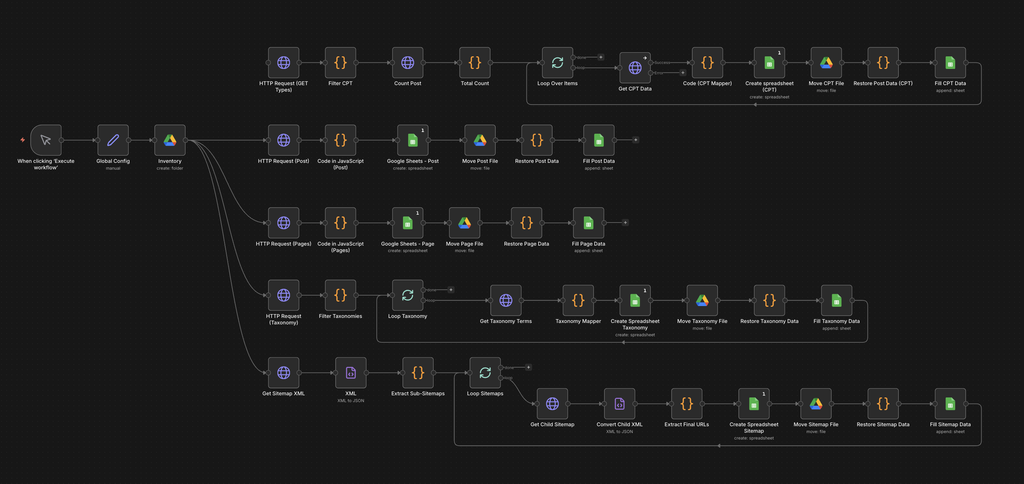
Where analytics data is available, I also synchronize the inventory with Google Search Console and Google Analytics 4. I use n8n to collect and normalize this data, although this layer is optional. The same consolidation can be handled by an AI agent through the relevant APIs, or by exporting reports from GSC and GA4 and combining them with the migration inventory. This provides a stronger baseline for deciding which URLs, search signals, traffic patterns, and conversions should be preserved or improved.
This information can come from a local Divi copy, WordPress exports, WP-CLI, the REST API, sitemaps, and frontend crawling.
I want the migration dataset to be ready before placing the first Bricks element. Building too early usually creates rework because an important template, content type, or design pattern appears later.
3. Configure Bricks and project-specific skills
Next, I give the AI the context it needs to work safely inside Bricks.
The base skills explain Bricks concepts and data structures. My custom instructions add the conventions that are specific to my workflow, such as:
- Section and container structure
- BEM class naming
- Global variables instead of arbitrary values
- Rules for reusable components
- Responsive behavior
- Accessibility requirements
- The order in which the AI should inspect, propose, write, and verify
This prevents the model from treating every section as an isolated design exercise.
4. Establish the design system first
Before rebuilding pages, I create the global foundation:
- Local fonts and font-face definitions
- Color variables
- Typography scales
- Spacing and sizing variables
- Theme styles
- Breakpoints
- Container widths
- Button and link behavior
The values can be informed by the original website, but I do not always reproduce them blindly. A migration is a good opportunity to normalize inconsistent values and remove design debt.
Once this system exists, generated sections can refer to shared variables instead of introducing random pixel values on every page.
5. Manually scaffold the important patterns
I build this foundation manually because the AI starts without project-specific context or persistent memory, and every website has a different structure, design system, content model, and set of constraints.
This manual scaffold acts as project-specific training. It does not retrain the underlying model; instead, it gives the AI concrete examples of how I expect the rebuild to be structured, which patterns to reuse, and which standards it must follow. The better these reference implementations capture my process, the more consistently the AI can execute the rest of the project.
I manually build a small set of representative components before asking the AI to scale the work.
These may include:
- Primary and secondary buttons
- Service or feature cards
- Repeating content sections
- Content-and-image layouts
- Calls to action
- Form wrappers
- Navigation patterns
These examples act as executable documentation. They show the AI exactly how I expect a real Bricks element tree to be structured—not merely how I describe it in a prompt.
The goal is not to hand-build the entire website. It is to provide a reliable grammar from which the remaining pages can be constructed.
6. Let the AI generate within those constraints
What stays manual—and what runs through MCP
I keep the decisions that define the project manual. I establish the architecture, design system, reference components, class conventions, exceptions, and acceptance criteria. I also review the Bricks structure and rendered frontend before approving each batch.
- Manual: define standards, create representative patterns, resolve edge cases, and make final design and architecture decisions.
- Through MCP and the AI agent: inspect the source, build the inventory, create Bricks structures, import content and media, apply established classes and variables, and run repeatable validation.
Images need their own workflow. I often find source images that were never properly optimized. My custom skill instructs the AI to upload each asset through the normal WordPress media workflow, just as a user would, rather than bypassing the Media Library. This allows the site’s image-optimization pipeline to compress the file and generate WebP versions, while the AI adds accurate alternative text based on the image and its page context.
Blog content also requires cleanup. Divi websites often leave builder shortcodes inside WordPress post_content. My custom skill instructs the AI to detect and remove those Divi shortcodes, extract the meaningful content, and rebuild it as native Gutenberg blocks. Headings, paragraphs, lists, links, images, and other semantic content must be preserved instead of copying the shortcode-heavy source directly into the new site.
This means the import is not merely a database copy. It is a controlled normalization process that produces cleaner WordPress content and a more maintainable handoff.
Once the design system and reference components are ready, I ask the AI to build the remaining sections and pages.
At this stage, it can reuse established classes, follow existing structures, connect content to the right components, and handle much of the repetitive work.
I still prefer small, reviewable batches over one enormous instruction such as “rebuild the whole website.” A practical unit of work might be one page, one template, or a related group of sections.
After every write, I inspect both the Bricks structure and the rendered frontend. A technically valid element tree can still produce poor spacing, incorrect responsive behavior, broken dynamic data, or unnecessary markup.
7. Correct, document, and repeat
The first output is rarely perfect.
When I find a structural mistake, I do more than fix that single instance. I turn the correction into a reusable rule or update the reference component so that the same error is less likely to appear again.
This creates a feedback loop:
- Generate a small batch.
- Review its structure and frontend output.
- Correct the underlying pattern.
- Add the lesson to the project instructions or skills.
- Generate the next batch with better context.
The AI is not permanently learning in the human sense. The improvement comes from making the project context, examples, and rules increasingly precise.
What AI accelerates—and what it does not replace
AI is particularly useful for:
- Extracting and organizing migration data
- Identifying repeated patterns
- Creating repetitive Bricks structures
- Applying established classes and variables
- Moving content into consistent layouts
- Comparing source and target pages
- Running repeatable validation checks
It does not remove the need for:
- Information architecture decisions
- Visual judgment
- Content cleanup
- Accessibility review
- Responsive testing
- SEO validation
- Performance testing
- Backups and rollback plans
- Human approval before deployment
The quality of the result depends heavily on the quality of the system around the model. Without a design system, representative examples, and verification rules, AI simply produces inconsistent work more quickly.
Why I prefer fewer dependencies
This workflow also supports my broader goal of keeping client websites lean.
Every permanent add-on introduces another update cycle, interface, compatibility surface, and handoff consideration. That does not make third-party plugins inherently bad—some solve difficult problems extremely well—but I no longer install one automatically for every small feature.
When a feature can be implemented cleanly in the child theme or with a focused snippet, I prefer owning that implementation. The result is easier for me to reason about and often easier to explain to the next person maintaining the site.
AI makes this approach more practical because it reduces the time required to inspect documentation, scaffold code, and repeat established patterns. The architectural decision, however, remains mine.
Is this workflow ready for everyone?
Not yet.
The Bricks AI and abilities ecosystem is still evolving, and my own workflow is still evolving with it. It requires comfort with local WordPress development, command-line tools, structured troubleshooting, backups, and careful review.
If someone expects a one-click converter, this approach will feel too technical. If they already understand Bricks and want to turn their standards into a repeatable system, it can save a significant amount of time.
The biggest lesson from rebuilding these sites is not that AI can replace a Bricks developer. It is that an experienced Bricks developer can encode more of their working method—then use AI to execute that method at a much larger scale.
That is the part I find most exciting.
Technical references
Any questions or want to discuss this further?
If you have questions about this workflow or want to discuss a Divi-to-Bricks rebuild, get in touch with me.